
How to Write LinkedIn Posts with AI (Without Sounding Like a Robot)
How to write LinkedIn posts with AI comes down to one shift: use AI to structure and polish your own raw thoughts, not to invent them from a blank prompt. Feed it your real experience, your past posts, and specific constraints, and it will sound like you. Skip that step and you get the same generic paragraph everyone else is posting this week.
Introduction
You open ChatGPT, type in a topic, and hit generate. What comes back reads fine on the surface, and technically nothing is wrong with it. It just does not sound like you. It sounds like it could have been written by anyone with the same prompt.
That gap between "technically correct" and "actually yours" is the whole problem with AI content on LinkedIn right now. A recent industry study found that over half of long-form LinkedIn posts in 2025 were likely written or heavily assisted by AI, and readers are starting to feel the sameness even when they cannot name it.
The professionals who are actually growing on LinkedIn this year are not avoiding AI. They are using it at a different stage of the process, and with tools that remember how they write instead of starting over every time. This guide walks through that exact workflow, with before-and-after examples, a step-by-step process, and the tools that make voice-matching possible.
Table of contents
- The problem: your AI posts sound like everyone else's
- Why most AI tools produce "AI slop"
- The voice-learning approach
- Step-by-step: how to use AI for LinkedIn posts properly
- Before and after examples
- Tools that actually learn your voice
- Tips for editing AI-generated LinkedIn content
- FAQs
The problem: your AI posts sound like everyone else's
Most people use AI backwards for LinkedIn. They hand it a topic and expect a finished post. What comes back reads like the paragraph everyone else got from the same prompt: broad, safe, and forgettable.
Here is the part that stings. Your audience notices, even if they could not explain why. A couple of posts like that and people start scrolling past your name without reading. The credibility you built up over months erodes quietly, one skipped post at a time.
The good news is that the problem was never AI itself. It is how most people are using it. Fix the workflow and the same tool produces something worth reading.
Why most AI tools produce "AI slop"
AI models predict the most statistically likely next word. They write the way everyone writes because they were trained on how everyone writes. There is no personal history, no specific client story, no actual opinion baked into a blank prompt, so the output comes back polished and empty.
That is a big part of why Originality.ai's 2025 analysis of long-form LinkedIn posts found the majority carried strong signs of AI generation, with the pattern especially pronounced in industries where posting volume is high and personal storytelling is thin.
It gets worse from a distribution standpoint too. Posts that read as templated tend to get scrolled past quickly, and quick scrolls are a weak signal that tells the algorithm not to push a post further. Generic AI writing does not just flatten your brand. It quietly caps your reach.
The clearest tells that a post came from a blank AI prompt:
- Opening with "In today's fast-paced world" or "As leaders, we often forget"
- A numbered list with no story or specific example behind it
- A closer like "What are your thoughts? Drop a comment below"
- Every sentence running the same length, with no rhythm
- Words like leverage, synergy, landscape, dive deep, and actionable insights
If three or more of those show up in your last five posts, the workflow needs a fix, not more prompting.
The voice-learning approach
Here is the shift that actually changes how your AI-assisted posts read: stop using AI as the writer. Use it as the editor.
The common approach is to have an idea, hand AI a prompt, and post whatever comes back. The approach that works is to capture the idea in your own words first, then let AI structure and polish what you already said.
That order matters more than any prompt trick. When AI starts from your real thought, the output is grounded in something specific instead of averaged from everyone else's content.
Voice-learning takes this further. Instead of treating every AI session as a blank slate, you give it your past posts and your actual communication style as a reference point. Think of the difference between a ghostwriter who has never met you and one who spent a week studying everything you have written. The second one sounds like you far more often.
Step-by-step: how to use AI for LinkedIn posts properly
The right workflow is what separates AI content that gets read from content that gets scrolled past. Here is a practical process you can start using on your next post.
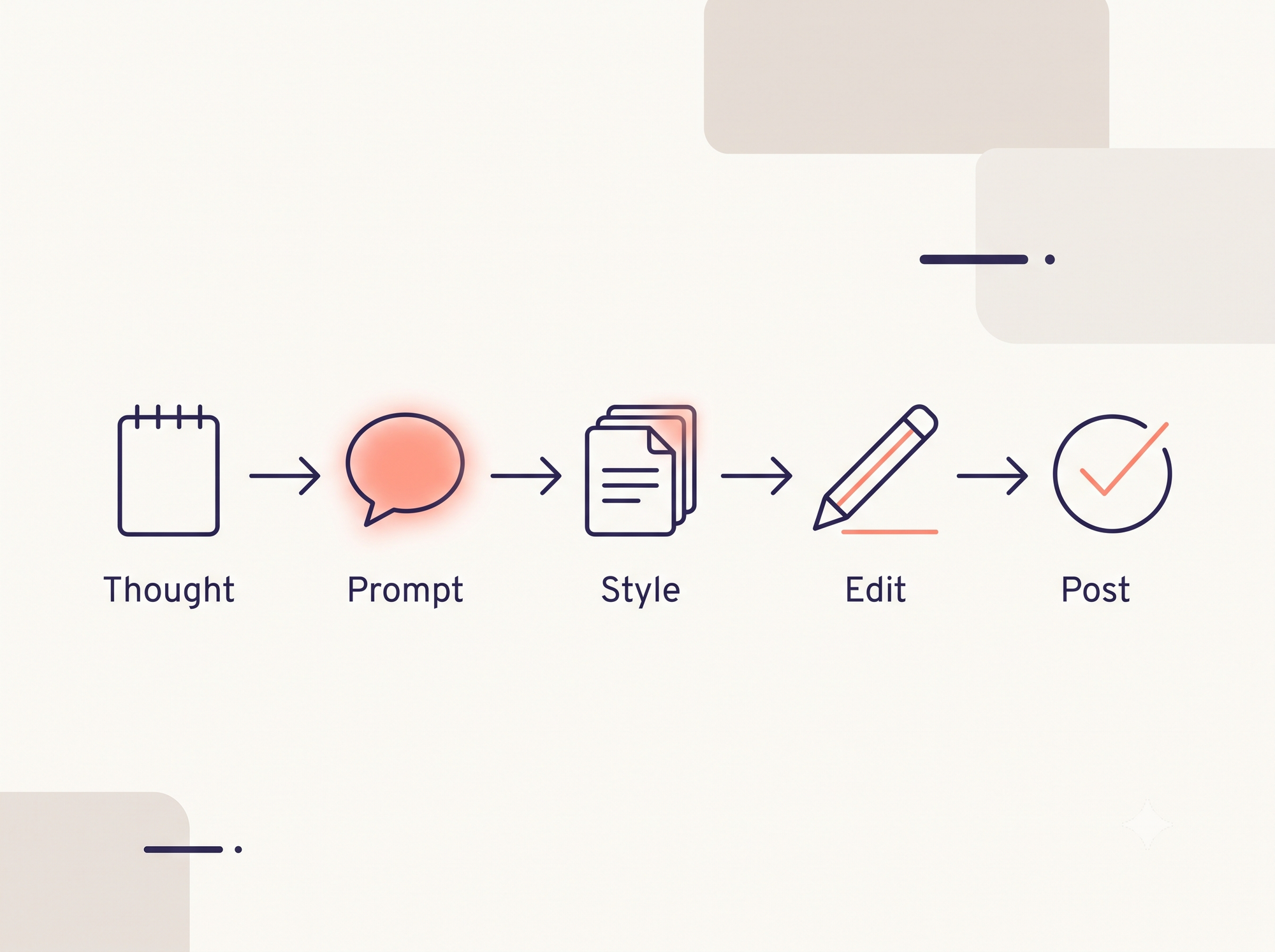
Step 1: Start with your raw thought. Before opening any AI tool, write your core idea in your own words. It does not need polish. Three messy bullet points or a paragraph typed while thinking out loud is enough, as long as it is a real experience rather than a general topic.
Step 2: Give AI a specific task, not a blank prompt. Do not type "write me a LinkedIn post about project management." Paste your raw thought instead and add constraints: keep the tone casual, cut the jargon, make the opening line specific rather than motivational.
Step 3: Feed it a style reference. Paste one or two of your past posts that performed well and ask it to match that tone and sentence rhythm. This is the step that separates content that sounds like a company memo from content that sounds like you.
Step 4: Read it once, then rewrite the opening line yourself. The first line is usually where AI slips into its most generic pattern, so rewrite it from scratch in your own words.
Step 5: Add one detail only you could write. A specific number, a real story, an opinion an AI could not invent. That detail is what makes the post unmistakably yours.
Step 6: Run the robot check. Scan for leverage, synergy, landscape, dive deep, game-changer, and actionable, and delete every one before you hit publish.
Before and after examples
Nothing makes the difference clearer than seeing it side by side.
Topic: a difficult client conversation
Before (a blank AI prompt):
"Navigating challenging client relationships is one of the most important skills in today's professional landscape. When conflicts arise, it's essential to leverage your communication skills to create meaningful dialogue. Here are 3 things I've learned: 1. Listen actively. 2. Set clear expectations. 3. Follow up consistently. What strategies have worked for you?"
After (AI used as editor, starting from a real story):
"We almost lost a six-month project over a single email. The client thought we were redesigning their entire product. We thought we were fixing the checkout flow. Same contract, different assumptions, and nobody asked the obvious question. I've started every project since with one rule: the uncomfortable conversation in week one beats the one you'll have in month six."
The second version is shorter, built on a real story, and ends with a specific lesson instead of a generic prompt for comments. It took a few minutes of honest reflection and a couple of minutes of AI polish. That is the entire method.
| Signal | Blank-prompt AI post | Voice-learning approach |
|---|---|---|
| Starting point | Topic typed into a new chat | Your own raw notes or a transcribed thought |
| Opening line | Broad statement or motivational hook | Specific detail or number rewritten by hand |
| Reference material | None, every session starts blank | Past posts and personal style fed in as context |
| Vocabulary | Leverage, synergy, actionable, landscape | Plain language matched to how you actually talk |
| Closing line | "What are your thoughts? Drop a comment below" | A specific question tied to the story just told |
Tools that actually learn your voice
Generic chatbots like ChatGPT or Claude are capable, but they start fresh every time you open a new chat. They have no memory of your niche, your past posts, or your tone unless you paste it in manually every single session.
Purpose-built LinkedIn tools close that gap by keeping a running memory of your style. CannerAI is one of the more complete examples in this category. It came out of founder Piyush Sachdeva's own workflow problem: juggling five separate tabs across research, drafting, design, and scheduling just to publish one post, which is the same tab-switching loop this guide opened with.
What that looks like in practice:
- Personalized memory. CannerAI keeps track of your past content and writing patterns, so its drafts get closer to your actual voice the more you use it, instead of defaulting to a generic professional tone.
- Context Vault. A personal library for research notes and ideas that the AI can pull from when drafting, so a new post starts with your own context rather than a blank page.
- Research-to-post. Paste a URL or a topic and CannerAI researches it, pulls out the key points, and drafts a post in your style, which is useful for reacting to industry news without spending twenty minutes reading and summarizing it yourself.
- Connectors. Connect YouTube channels, including your own or ones you follow, and CannerAI generates draft posts automatically whenever a new video goes up. You review, edit, and approve before anything publishes.
The Individual plan starts at $19.99 a month with a 7-day free trial, and the Creator plan at $49.99 a month adds unlimited scheduling, 120+ templates, carousels, and 300 Context Vault items with a 15-day trial. If you are weighing CannerAI against other tools in this space, the comparison in CannerAI vs Taplio breaks down where the two diverge, and the best Supergrow alternatives for 2026 roundup covers a few more options worth knowing about. For a broader look at the category, 13 best AI tools for LinkedIn in 2026 compares several side by side, and CannerAI's AI content writer page has more detail on the voice-matching mechanics described above.
Tips for editing AI-generated LinkedIn content

Even a well-prompted AI draft needs a human pass before it goes live. A few habits make the difference:
Rewrite the first line every time. Only the first couple of lines show before someone has to click "see more," and AI almost always writes a weak or overly formal opener there.
Cut it by roughly a fifth. AI tends to restate the same point twice. Find the sentence that repeats what the previous one already said, and delete it.
Check the rhythm. Real writing mixes short sentences with longer ones. If every sentence in the draft runs the same length, that is a clear tell it was machine-written, so vary it on purpose.
Add one specific number or detail. "Most people struggle with this" is easy to scroll past. A concrete figure or a named example makes a reader pause.
Read it out loud before posting. If you would not say it that way in conversation, do not post it. It is the simplest test for whether a draft still sounds human.
Post when your audience is actually there. According to Buffer's 2026 analysis of millions of LinkedIn posts, engagement is shifting toward late afternoon and evening windows on weekdays, alongside the more familiar Tuesday-through-Thursday pattern, so it is worth testing both instead of assuming mornings are always best.
FAQs
Is it okay to use AI to write LinkedIn posts?
Yes. LinkedIn does not penalize AI use directly, but its algorithm does notice low engagement, which tends to happen when posts are generic. Use AI to help you write faster, not to replace your actual experience and opinions.
How do I make AI-generated LinkedIn posts sound more human?
Start from your own raw thoughts before opening any AI tool. Feed it examples of your past writing so it can match your style, rewrite the opening line yourself, and add one specific detail or number only you could know. Cutting words like leverage and synergy helps too.
What is the best AI tool for writing LinkedIn posts?
It depends on how often you post. A detailed prompt in a general tool like ChatGPT can work for one-off posts if you supply enough context about your voice. For consistent posting, purpose-built tools such as CannerAI are built specifically for LinkedIn and carry your writing style across sessions instead of starting blank each time.
Can LinkedIn detect AI-generated content?
LinkedIn has not published a public AI detector, but its feed relevance systems track engagement patterns, and posts that read as templated or duplicate tend to get shown to fewer people over time. independent research on long-form LinkedIn posts has found AI-likely content is common across most industries, which is part of why generic posts increasingly underperform.
How long should a LinkedIn post be?
There is no single right length, but a post in the 150 to 400 word range that tells a specific story or makes one clear argument tends to hold attention better than either a one-line quote or a sprawling essay. Keep it long enough to be interesting and short enough to read in under two minutes.
How often should I post on LinkedIn using AI?
Three to four strong posts a week tend to outperform seven rushed ones, since LinkedIn's ranking rewards how long people actually spend reading a post rather than raw posting frequency. If a tool like CannerAI is saving you drafting time, put that time back into making each post sharper instead of publishing more often.
What LinkedIn post format gets the best engagement?
native document posts, which display as swipeable carousels in the feed, currently generate the highest engagement of any LinkedIn format, according to Social Insider's 2026 benchmark analysis of over a million posts, with multi-image posts close behind. That said, a well-written text post with a strong hook and a real story can still outperform a low-effort carousel, so format matters less than what is actually inside it.
Does CannerAI work for X (Twitter) posts too?
Yes. CannerAI supports both LinkedIn and X, and posts can be created, scheduled, and published to both from the same workspace.



Member discussion