Is Taplio Safe? What Actually Gets LinkedIn Accounts Restricted in 2026
Taplio is safe to use for writing and scheduling content, but some of its features connect to LinkedIn through browser cookies instead of LinkedIn's official API, and cookie based access is exactly what LinkedIn has been cracking down on since 2024. Whether Taplio is safe for you depends almost entirely on which features you turn on. Tools built only on LinkedIn's official OAuth connection avoid this category of risk by design.
If you've typed "is Taplio safe" into Google at 11pm because you just saw a warning on Reddit, you're not being paranoid. LinkedIn has genuinely changed how it treats third party tools over the past two years, and a few well known names have already been hit. This post walks through what actually happened, where Taplio sits in that landscape, and what to do about it whether you keep using it or not.
Table of contents
- What people are really asking when they search "is Taplio safe"
- What changed in LinkedIn's enforcement between 2024 and 2025
- Where Taplio actually sits: low risk vs high risk features
- What LinkedIn account restrictions look like in practice
- OAuth vs cookies: the tell that actually matters
- How to use Taplio more safely if you're staying
- A safer by design alternative
- The honest bottom line
- FAQs
What people are really asking when they search "is Taplio safe"
There are really two different questions hiding inside that search, and most articles answer only one of them.
The first is whether Taplio is a legitimate company. That one is easy. Taplio is a real, well funded product with a large creator user base, and it was acquired by Lempire. There's no scam angle here.
The second question is the one worth taking seriously: will using Taplio get your LinkedIn account restricted? The honest answer isn't yes or no. It's "it depends on which features you use," and that nuance is exactly what gets lost when a search result gives you a flat verdict either way.
What changed in LinkedIn's enforcement between 2024 and 2025
For years, LinkedIn mostly tolerated third party tools that read or acted on your account outside its official API. That tolerance narrowed considerably through 2024 and into 2025, when LinkedIn ran a noticeably more aggressive enforcement push against tools reaching into the platform through browser sessions rather than approved API access.
The pattern shows up across the industry, not just around Taplio. Apollo and Seamless both saw restrictions tied to scraping activity, and Kleo's original Chrome extension reportedly received a cease and desist over data scraping and had to rebuild its approach from scratch. Even Taplio's own company page was reportedly restricted for a period during this wave. [SOURCE NEEDED: dated reporting on the 2024-2025 enforcement wave]
None of that means every third party tool is doomed. It means LinkedIn drew a clearer line than before: build on the official API and you're generally fine, reach into the platform through cookies and automated actions and you're exposed to enforcement.
Where Taplio actually sits: low risk vs high risk features
Taplio isn't one thing. It's a bundle of features, and they don't carry equal risk. That's the part most "is Taplio safe" articles miss when they give a flat yes or no answer.
The low risk side covers AI post writing, the viral post library, the carousel creator, and content suggestions. These run entirely inside Taplio's own app. Drafting a post with AI and then publishing it yourself is not something LinkedIn has any issue with.
The higher risk side covers the parts that act on LinkedIn directly on your behalf. Taplio uses a browser extension and cookie based session access for some features, and it offers engagement and outreach functionality on top of that. Cookie based access is precisely what LinkedIn's detection systems are built to catch, since the tool is riding your logged in session instead of using a permission LinkedIn actually granted. Requests that arrive at machine speed, or from an unfamiliar location, are the kind of signal that gets an account flagged.
This split explains why user reports are so mixed. People who use Taplio purely to write and schedule content rarely mention problems. People who lean on the automation and engagement features are the ones showing up in communities like r/linkedin and r/sales describing warnings and temporary restrictions.
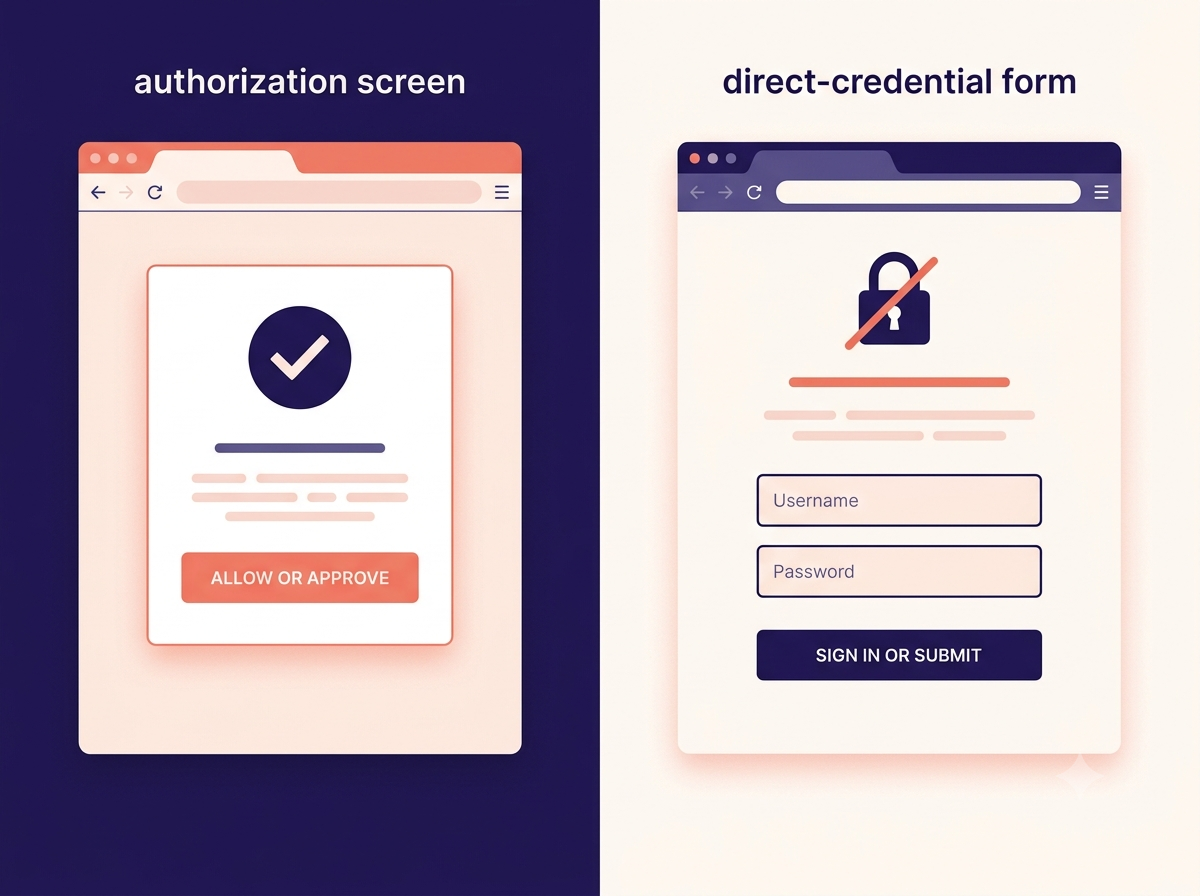
OAuth based tools connect through a permission screen on LinkedIn's own domain and can be revoked from LinkedIn's settings at any time. Cookie based tools use your active browser session directly, which is the access pattern LinkedIn's 2024-2025 enforcement has targeted most consistently.
See how CannerAI's OAuth only connection worksWhat LinkedIn account restrictions look like in practice
If LinkedIn flags an account, it's rarely a dramatic permanent ban out of nowhere. The common outcomes, roughly in order of severity, look more like this:
- An identity check, where LinkedIn asks you to verify by email or phone before you can keep using the account.
- A temporary posting restriction that lasts anywhere from a few days to a couple of weeks.
- A review flag, where the account sits in front of LinkedIn's trust and safety team for manual evaluation.
- A permanent restriction, which is uncommon and usually follows repeated violations after an earlier warning.
There's also a quieter outcome people notice but can't always explain: a drop in reach that isn't labeled as a restriction anywhere. Nothing tells you it happened. Your posts simply stop traveling as far as they used to.
OAuth vs cookies: the tell that actually matters
You don't need to understand LinkedIn's backend to protect yourself here. There's one visible signal that tells you which category a tool falls into.
If a tool asks you to type your LinkedIn email and password directly into its own login screen, it's using cookie based access. It's borrowing your session rather than being granted a permission by LinkedIn. If a tool instead redirects you to a real page on LinkedIn.com asking you to approve specific permissions, that's OAuth, and LinkedIn can see, audit, and revoke that access on its own terms at any time.
This single detail is worth checking before you connect any scheduling or automation tool to your account, not just Taplio.
How to use Taplio more safely if you're staying
You don't have to abandon Taplio to lower your risk. If you're keeping it in your workflow, a few adjustments go a long way.
Use it for writing, ideas, and carousel creation, and skip the auto engagement and outreach automation features. Publish manually when you can, or route scheduling through a tool that connects via LinkedIn's official OAuth rather than cookies. And keep an eye on that login screen tell described above, since it applies to any tool you're evaluating, not just this one.
A safer by design alternative
If account safety is the reason you're reading this, the cleanest fix is a tool that never touches cookies in the first place. CannerAI connects to LinkedIn and X only through official OAuth. You authorize it on LinkedIn's own permission screen, LinkedIn issues a token it can audit and revoke on its own terms, and your credentials never live inside CannerAI's app at any point.
CannerAI also researches a URL or topic before it drafts, learns your writing voice over time through its Context Vault, and publishes through the official API rather than a browser extension riding your session.
This isn't a knock on Taplio's writing tools, which are genuinely good. It's a different bet: build entirely inside the lines LinkedIn draws, so account safety stops being something you have to think about every time a new enforcement wave hits the news. You can see the full connection details on our security page, and a feature by feature breakdown on CannerAI vs Taplio.
The honest bottom line
Taplio is safe to use for content. It gets riskier the moment you turn on the features that automate actions or rely on cookie based access, and that risk is real because LinkedIn is actively enforcing against exactly that access pattern. If you only ever write and publish through Taplio, you'll probably be fine. If you'd rather stop thinking about it entirely, choose a tool that connects through LinkedIn's official API from the start. For the deeper technical explanation of why cookie access carries more risk than OAuth, see our full technical breakdown of Taplio's safety mechanics, and for tool by tool alternatives, see our Taplio alternative guide.
FAQs
Has Taplio been banned by LinkedIn?
No. Taplio is an active, widely used product and hasn't been shut down. During LinkedIn's 2025 enforcement wave, Taplio's own company page was reportedly restricted for a period, and some users have reported individual account warnings tied to its automation and cookie based features, but the product itself remains available.
Can Taplio get my LinkedIn account restricted?
It can, depending on which features you use. Writing and scheduling content carries little risk since those actions happen inside Taplio's own app. The engagement automation and cookie based session features are the ones LinkedIn's detection is built to catch, and that's where user reported restrictions tend to cluster.
Is Taplio against LinkedIn's Terms of Service?
Parts of it sit in a gray area. LinkedIn's developer terms authorize access through official OAuth and its Posts API, and treat session token or cookie based access outside of OAuth as unauthorized. Tools using cookie based access are operating against those terms regardless of how many creators use them.
What's the safest way to schedule LinkedIn posts?
Use a scheduler that connects through LinkedIn's official OAuth rather than copying your browser session. You can confirm a tool uses OAuth by watching for a real LinkedIn.com permission screen during sign up. If a tool ever asks you to type your LinkedIn password into its own interface, it's using cookie based access instead.
Is there a safer alternative to Taplio?
Yes. Tools built entirely on LinkedIn's official API avoid the cookie based risk category by design. CannerAI connects through OAuth only, writes in your personal voice, and publishes to LinkedIn and X through the official API. See the full Taplio alternative breakdown for a side by side comparison.
Why did my LinkedIn reach drop after using a scheduling tool?
A quiet reach drop, sometimes called a shadow-style restriction, is one of the outcomes LinkedIn applies without a visible notification. It's most often linked to accounts using automated engagement or cookie based session tools rather than tools connected through the official API.
Does CannerAI use cookies to connect to LinkedIn?
No. CannerAI connects exclusively through LinkedIn's official OAuth flow. You approve access on LinkedIn's own permission screen, and LinkedIn issues a token that can be reviewed or revoked from your LinkedIn account settings at any time.



Member discussion